Running scripts
A Python script is a file intended for standalone execution, e.g., with python <script>.py. Using
fyn to execute scripts ensures that script dependencies are managed without manually managing
environments.
Note
If you are not familiar with Python environments: every Python installation has an environment that packages can be installed in. Typically, creating virtual environments is recommended to isolate packages required by each script. fyn automatically manages virtual environments for you and prefers a declarative approach to dependencies.
Running a script without dependencies
If your script has no dependencies, you can execute it with fyn run:
If you want a plain python command that follows fyn's interpreter resolution rules, install the
shim with fyn python install-shim.
Similarly, if your script depends on a module in the standard library, there's nothing more to do:
Arguments may be provided to the script:
Additionally, your script can be read directly from stdin:
Or, if your shell supports here-documents:
Note that if you use fyn run in a project, i.e., a directory with a pyproject.toml, it will
install the current project before running the script. If your script does not depend on the
project, use the --no-project flag to skip this:
$ # Note: the `--no-project` flag must be provided _before_ the script name.
$ fyn run --no-project example.py
See the projects guide for more details on working in projects.
Running a script with dependencies
When your script requires other packages, they must be installed into the environment that the script runs in. fyn prefers to create these environments on-demand instead of using a long-lived virtual environment with manually managed dependencies. This requires explicit declaration of dependencies that are required for the script. Generally, it's recommended to use a project or inline metadata to declare dependencies, but fyn supports requesting dependencies per invocation as well.
For example, the following script requires rich.
import time
from rich.progress import track

for i in track(range(20), description="For example:"):
    time.sleep(0.05)
If executed without specifying a dependency, this script will fail:
$ fyn run --no-project example.py
Traceback (most recent call last):
  File "/Users/astral/example.py", line 2, in <module>
    from rich.progress import track
ModuleNotFoundError: No module named 'rich'
Request the dependency using the --with option:
Constraints can be added to the requested dependency if specific versions are needed:
Multiple dependencies can be requested by repeating with --with option.
Note that if fyn run is used in a project, these dependencies will be included in addition to
the project's dependencies. To opt-out of this behavior, use the --no-project flag.
Creating a Python script
Python recently added a standard format for
inline script metadata.
It allows for selecting Python versions and defining dependencies. Use fyn init --script to
initialize scripts with the inline metadata:
Declaring script dependencies
The inline metadata format allows the dependencies for a script to be declared in the script itself.
fyn supports adding and updating inline script metadata for you. Use fyn add --script to declare
the dependencies for the script:
This will add a script section at the top of the script declaring the dependencies using TOML:
# /// script
# dependencies = [
#   "requests<3",
#   "rich",
# ]
# ///

import requests
from rich.pretty import pprint

resp = requests.get("https://peps.python.org/api/peps.json")
data = resp.json()
pprint([(k, v["title"]) for k, v in data.items()][:10])
fyn will automatically create an environment with the dependencies necessary to run the script, e.g.:
$ fyn run example.py
[
│   ('1', 'PEP Purpose and Guidelines'),
│   ('2', 'Procedure for Adding New Modules'),
│   ('3', 'Guidelines for Handling Bug Reports'),
│   ('4', 'Deprecation of Standard Modules'),
│   ('5', 'Guidelines for Language Evolution'),
│   ('6', 'Bug Fix Releases'),
│   ('7', 'Style Guide for C Code'),
│   ('8', 'Style Guide for Python Code'),
│   ('9', 'Sample Plaintext PEP Template'),
│   ('10', 'Voting Guidelines')
]
Important
When using inline script metadata, even if fyn run is used in a project, the project's dependencies will be ignored. The --no-project flag is not required.
fyn also respects Python version requirements:
# /// script
# requires-python = ">=3.12"
# dependencies = []
# ///

# Use some syntax added in Python 3.12
type Point = tuple[float, float]
print(Point)
Note
The dependencies field must be provided even if empty.
fyn run will search for and use the required Python version. The Python version will download if
it is not installed — see the documentation on Python versions for
more details.
Using a shebang to create an executable file
A shebang can be added to make a script executable without using fyn run — this makes it easy to
run scripts that are on your PATH or in the current folder.
For example, create a file called greet with the following contents
Ensure that your script is executable, e.g., with chmod +x greet, then run the script:
Declaration of dependencies is also supported in this context, for example:
#!/usr/bin/env -S fyn run --script
#
# /// script
# requires-python = ">=3.12"
# dependencies = ["httpx"]
# ///

import httpx

print(httpx.get("https://example.com"))
Using alternative package indexes
If you wish to use an alternative package index to resolve dependencies,
you can provide the index with the --index option:
This will include the package data in the inline metadata:
If you require authentication to access the package index, then please refer to the package index documentation.
Locking dependencies
fyn supports locking dependencies for PEP 723 scripts using the fyn.lock file format. Unlike with
projects, scripts must be explicitly locked using fyn lock:
Running fyn lock --script will create a .lock file adjacent to the script (e.g.,
example.py.lock).
To preview script lockfile changes without writing the .lock file, use fyn lock diff with the
script path:
This resolves the script metadata in dry-run mode and reports package or lockfile metadata changes
that would be written by fyn lock --script.
Once locked, subsequent operations like fyn run --script, fyn add --script,
fyn export --script, and fyn tree --script will reuse the locked dependencies, updating the
lockfile if necessary.
If no such lockfile is present, commands like fyn export --script will still function as expected,
but will not create a lockfile.
Improving reproducibility
In addition to locking dependencies, fyn supports an exclude-newer field in the tool.fyn section
of inline script metadata to limit fyn to only considering distributions released before a specific
date. This is useful for improving the reproducibility of your script when run at a later point in
time.
The date should be specified as an RFC 3339 timestamp
(e.g., 2006-12-02T02:07:43Z).
# /// script
# dependencies = [
#   "requests",
# ]
# [tool.fyn]
# exclude-newer = "2023-10-16T00:00:00Z"
# ///

import requests

print(requests.__version__)
Using different Python versions
fyn allows arbitrary Python versions to be requested on each script invocation, for example:
See the Python version request documentation for more details on requesting Python versions.
Using GUI scripts
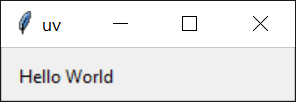
On Windows fyn will run your script ending with .pyw extension using pythonw:
from tkinter import Tk, ttk

root = Tk()
root.title("fyn")
frm = ttk.Frame(root, padding=10)
frm.grid()
ttk.Label(frm, text="Hello World").grid(column=0, row=0)
root.mainloop()
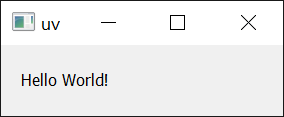
Similarly, it works with dependencies as well:
import sys
from PyQt5.QtWidgets import QApplication, QWidget, QLabel, QGridLayout

app = QApplication(sys.argv)
widget = QWidget()
grid = QGridLayout()

text_label = QLabel()
text_label.setText("Hello World!")
grid.addWidget(text_label)

widget.setLayout(grid)
widget.setGeometry(100, 100, 200, 50)
widget.setWindowTitle("fyn")
widget.show()
sys.exit(app.exec_())
Next steps
To learn more about fyn run, see the command reference.
Or, read on to learn how to run and install tools with fyn.