Using fyn in GitHub Actions
Installation
For use with GitHub Actions, we recommend the official
astral-sh/setup-uv action, which installs fyn, adds it to
PATH, (optionally) persists the cache, and more, with support for all fyn-supported platforms.
Note
The astral-sh/setup-uv action is maintained by Astral and is compatible with fyn.
To install the latest version of fyn:
name: Example

jobs:
  fyn-example:
    name: python
    runs-on: ubuntu-latest

    steps:
      - uses: actions/checkout@v6

      - name: Install fyn
        uses: astral-sh/setup-uv@v7
It is considered best practice to pin to a specific fyn version, e.g., with:
name: Example

jobs:
  fyn-example:
    name: python
    runs-on: ubuntu-latest

    steps:
      - uses: actions/checkout@v6

      - name: Install fyn
        uses: astral-sh/setup-uv@v7
        with:
          # Install a specific version of fyn.
          version: "0.10.17"
Setting up Python
Python can be installed with the python install command:
name: Example

jobs:
  fyn-example:
    name: python
    runs-on: ubuntu-latest

    steps:
      - uses: actions/checkout@v6

      - name: Install fyn
        uses: astral-sh/setup-uv@v7

      - name: Set up Python
        run: fyn python install
This will respect the Python version pinned in the project.
Alternatively, the official GitHub setup-python action can be used. This can be faster, because
GitHub caches the Python versions alongside the runner.
Set the
python-version-file
option to use the pinned version for the project:
name: Example

jobs:
  fyn-example:
    name: python
    runs-on: ubuntu-latest

    steps:
      - uses: actions/checkout@v6

      - name: "Set up Python"
        uses: actions/setup-python@v6
        with:
          python-version-file: ".python-version"

      - name: Install fyn
        uses: astral-sh/setup-uv@v7
Or, specify the pyproject.toml file to ignore the pin and use the latest version compatible with
the project's requires-python constraint:
name: Example

jobs:
  fyn-example:
    name: python
    runs-on: ubuntu-latest

    steps:
      - uses: actions/checkout@v6

      - name: "Set up Python"
        uses: actions/setup-python@v6
        with:
          python-version-file: "pyproject.toml"

      - name: Install fyn
        uses: astral-sh/setup-uv@v7
Multiple Python versions
When using a matrix to test multiple Python versions, set the Python version using
astral-sh/setup-uv, which will override the Python version specification in the pyproject.toml
or .python-version files:
jobs:
  build:
    name: continuous-integration
    runs-on: ubuntu-latest
    strategy:
      matrix:
        python-version:
          - "3.10"
          - "3.11"
          - "3.12"

    steps:
      - uses: actions/checkout@v6

      - name: Install fyn and set the Python version
        uses: astral-sh/setup-uv@v7
        with:
          python-version: ${{ matrix.python-version }}
If not using the setup-uv action, you can set the UV_PYTHON environment variable:
jobs:
  build:
    name: continuous-integration
    runs-on: ubuntu-latest
    strategy:
      matrix:
        python-version:
          - "3.10"
          - "3.11"
          - "3.12"
    env:
      UV_PYTHON: ${{ matrix.python-version }}
    steps:
      - uses: actions/checkout@v6
Syncing and running
Once fyn and Python are installed, the project can be installed with fyn sync and commands can be
run in the environment with fyn run:
name: Example

jobs:
  fyn-example:
    name: python
    runs-on: ubuntu-latest

    steps:
      - uses: actions/checkout@v6

      - name: Install fyn
        uses: astral-sh/setup-uv@v7

      - name: Install the project
        run: fyn sync --locked --all-extras --dev

      - name: Run tests
        # For example, using `pytest`
        run: fyn run pytest tests
Tip
The
UV_PROJECT_ENVIRONMENT setting can
be used to install to the system Python environment instead of creating a virtual environment.
Caching
It may improve CI times to store fyn's cache across workflow runs.
The astral-sh/setup-uv has built-in support for
persisting the cache:
Alternatively, you can manage the cache manually with the actions/cache action:
jobs:
  install_job:
    env:
      # Configure a constant location for the fyn cache
      UV_CACHE_DIR: /tmp/.fyn-cache

    steps:
      # ... setup up Python and fyn ...

      - name: Restore fyn cache
        uses: actions/cache@v5
        with:
          path: /tmp/.fyn-cache
          key: fyn-${{ runner.os }}-${{ hashFiles('fyn.lock') }}
          restore-keys: |
            fyn-${{ runner.os }}-${{ hashFiles('fyn.lock') }}
            fyn-${{ runner.os }}

      # ... install packages, run tests, etc ...

      - name: Minimize fyn cache
        run: fyn cache prune --ci
The fyn cache prune --ci command is used to reduce the size of the cache and is optimized for CI.
Its effect on performance is dependent on the packages being installed.
Tip
If using fyn pip, use requirements.txt instead of fyn.lock in the cache key.
Note
When using non-ephemeral, self-hosted runners the default cache directory can grow unbounded. In this case, it may not be optimal to share the cache between jobs. Instead, move the cache inside the GitHub Workspace and remove it once the job finishes using a Post Job Hook.
install_job:
  env:
    # Configure a relative location for the fyn cache
    UV_CACHE_DIR: ${{ github.workspace }}/.cache/fyn
Using a post job hook requires setting the ACTIONS_RUNNER_HOOK_JOB_STARTED environment
variable on the self-hosted runner to the path of a cleanup script such as the one shown below.
Using fyn pip
If using the fyn pip interface instead of the fyn project interface, fyn requires a virtual
environment by default. To allow installing packages into the system environment, use the --system
flag on all fyn invocations or set the UV_SYSTEM_PYTHON variable.
The UV_SYSTEM_PYTHON variable can be defined in at different scopes.
Opt-in for the entire workflow by defining it at the top level:
Or, opt-in for a specific job in the workflow:
Or, opt-in for a specific step in a job:
steps:
  - name: Install requirements
    run: fyn pip install -r requirements.txt
    env:
      UV_SYSTEM_PYTHON: 1
To opt-out again, the --no-system flag can be used in any fyn invocation.
Private repos
If your project has dependencies on private GitHub repositories, you will need to configure a personal access token (PAT) to allow fyn to fetch them.
After creating a PAT that has read access to the private repositories, add it as a repository secret.
Then, you can use the gh CLI (which is installed in GitHub Actions
runners by default) to configure a
credential helper for Git to use the
PAT for queries to repositories hosted on github.com.
For example, if you called your repository secret MY_PAT:
steps:
  - name: Register the personal access token
    run: echo "${{ secrets.MY_PAT }}" | gh auth login --with-token
  - name: Configure the Git credential helper
    run: gh auth setup-git
Publishing to PyPI
fyn can be used to build and publish your package to PyPI from GitHub Actions. We provide a standalone example alongside Astral's uv guide in astral-sh/trusted-publishing-examples. The workflow uses trusted publishing, so no credentials need to be configured.
In the example workflow, we use a script to test that the source distribution and the wheel are both functional and we didn't miss any files. This step is recommended, but optional.
First, add a release workflow to your project:
name: "Publish release to PyPI"

on:
  push:
    tags:
      # Publish on any tag starting with a `v`, e.g., v0.1.0
      - v*

jobs:
  run:
    runs-on: ubuntu-latest
    environment:
      name: pypi
    permissions:
      id-token: write
      contents: read
    steps:
      - name: Checkout
        uses: actions/checkout@v6
      - name: Install fyn
        uses: astral-sh/setup-uv@v7
      - name: Install Python 3.13
        run: fyn python install 3.13
      - name: Build
        run: fyn build
      # Check that basic features work and we didn't miss to include crucial files
      - name: Smoke test (wheel)
        run: fyn run --isolated --no-project --with dist/*.whl tests/smoke_test.py
      - name: Smoke test (source distribution)
        run: fyn run --isolated --no-project --with dist/*.tar.gz tests/smoke_test.py
      - name: Publish
        run: fyn publish
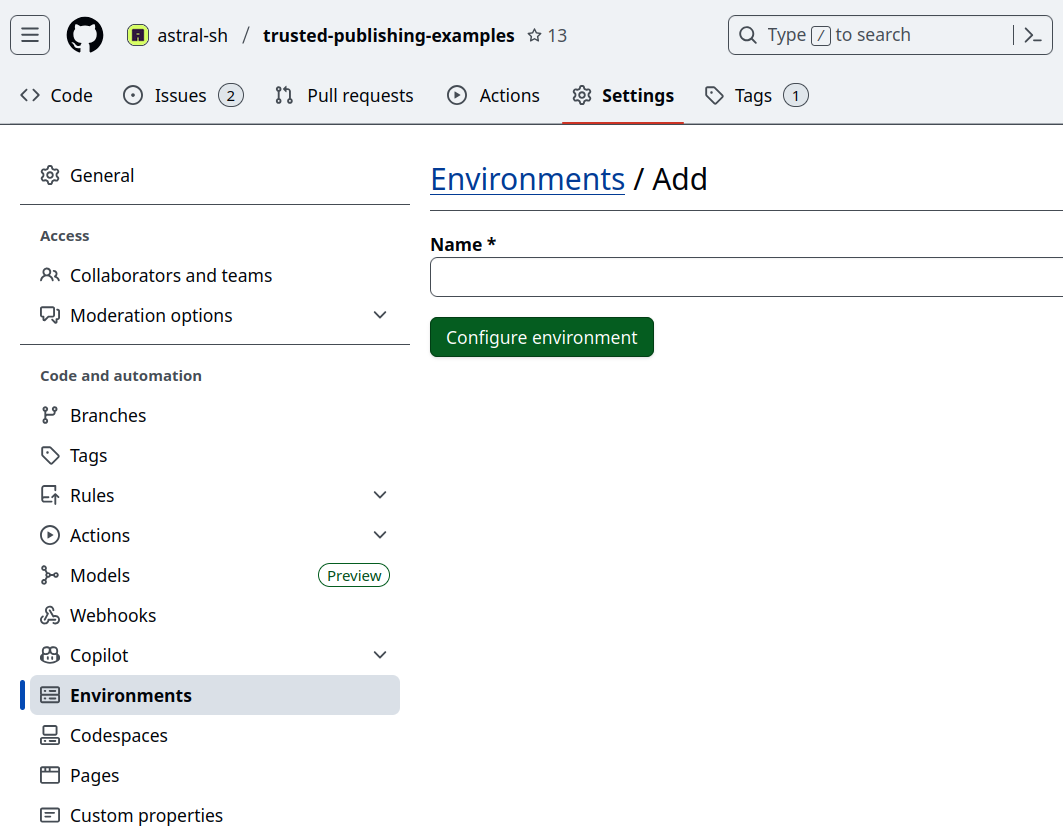
Then, create the environment defined in the workflow in the GitHub repository under "Settings" -> "Environments".
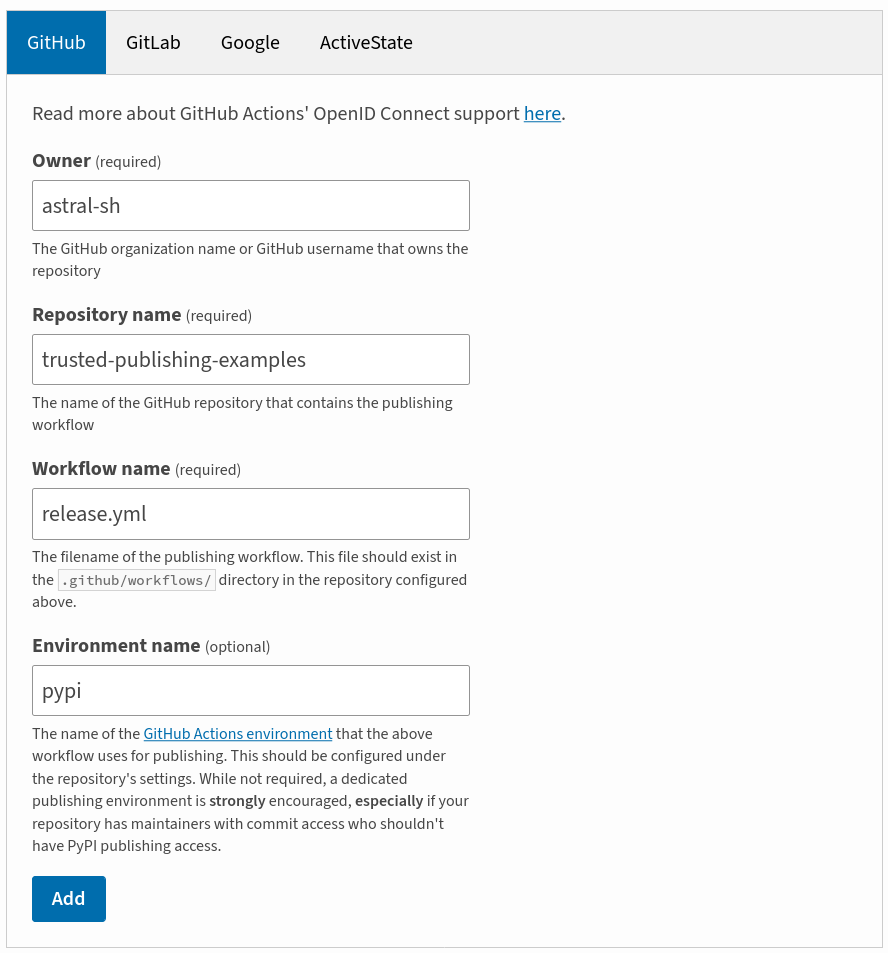
Add a trusted publisher to your PyPI project in the project settings under "Publishing". Ensure that all fields match with your GitHub configuration.
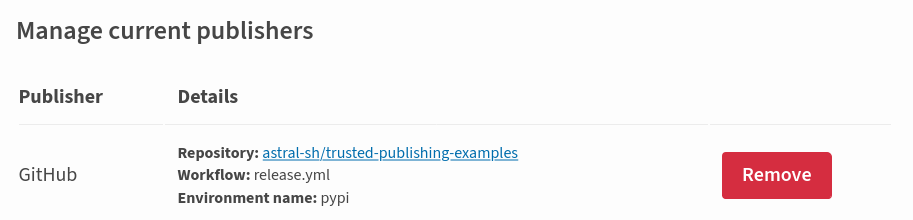
After saving:
Finally, tag a release and push it. Make sure it starts with v to match the pattern in the
workflow.